> ## Documentation Index
> Fetch the complete documentation index at: https://docs-staging-docs-ia-custom-database-connections.mintlify.site/llms.txt
> Use this file to discover all available pages before exploring further.

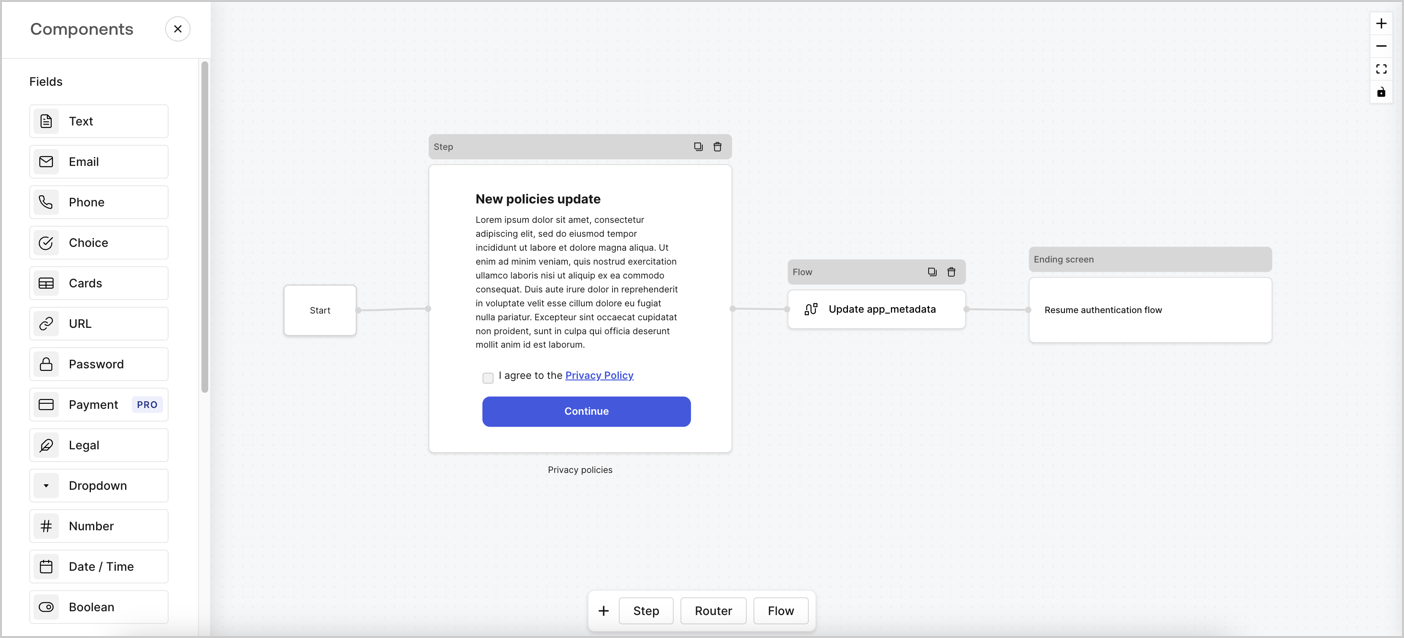
> Learn how to configure an update policy form using Forms for Actions for users to review and accept new terms of service or consent updates.

# Use Cases: Configure an update policy form using Forms

<Card title="Before you start">
  1. Create a [Machine-to-Machine Application](/docs/get-started/auth0-overview/create-applications/machine-to-machine-apps) with the following scopes enabled:

  * `read:users`
  * `update:users`
  * `create:users`
  * `read:users_app_metadata`
  * `update:users_app_metadata`
  * `create:users_app_metadata`

  2. Add a [Vault connection](/docs/customize/forms/vault) using the M2M application credentials.
</Card>

Forms for Actions allows you to create custom privacy policies flows and store the consent under the `app_metadata` object.
<Frame>
  <img src="https://mintcdn.com/docs-staging-docs-ia-custom-database-connections/JWORpyOPsa11uP0R/docs/images/cdy7uua7fh8z/6i68dMvHDTijfRmSgN1x8Q/ad900e7d4c0fb34645921435472b8684/privavy-policy-form.png?fit=max&auto=format&n=JWORpyOPsa11uP0R&q=85&s=0330a31e793cb7e940ee01c070a87f41" alt="Dashboard > Actions > Forms > Privacy policy use case" data-og-width="1404" width="1404" data-og-height="638" height="638" data-path="docs/images/cdy7uua7fh8z/6i68dMvHDTijfRmSgN1x8Q/ad900e7d4c0fb34645921435472b8684/privavy-policy-form.png" data-optimize="true" data-opv="3" srcset="https://mintcdn.com/docs-staging-docs-ia-custom-database-connections/JWORpyOPsa11uP0R/docs/images/cdy7uua7fh8z/6i68dMvHDTijfRmSgN1x8Q/ad900e7d4c0fb34645921435472b8684/privavy-policy-form.png?w=280&fit=max&auto=format&n=JWORpyOPsa11uP0R&q=85&s=996479815f538eaf8867f7d7b7c7e06b 280w, https://mintcdn.com/docs-staging-docs-ia-custom-database-connections/JWORpyOPsa11uP0R/docs/images/cdy7uua7fh8z/6i68dMvHDTijfRmSgN1x8Q/ad900e7d4c0fb34645921435472b8684/privavy-policy-form.png?w=560&fit=max&auto=format&n=JWORpyOPsa11uP0R&q=85&s=f3a472461461f6de84f44c92eb321eba 560w, https://mintcdn.com/docs-staging-docs-ia-custom-database-connections/JWORpyOPsa11uP0R/docs/images/cdy7uua7fh8z/6i68dMvHDTijfRmSgN1x8Q/ad900e7d4c0fb34645921435472b8684/privavy-policy-form.png?w=840&fit=max&auto=format&n=JWORpyOPsa11uP0R&q=85&s=a78b858b4dd59ba9f4a57e42b45720cd 840w, https://mintcdn.com/docs-staging-docs-ia-custom-database-connections/JWORpyOPsa11uP0R/docs/images/cdy7uua7fh8z/6i68dMvHDTijfRmSgN1x8Q/ad900e7d4c0fb34645921435472b8684/privavy-policy-form.png?w=1100&fit=max&auto=format&n=JWORpyOPsa11uP0R&q=85&s=3d9e221a970f881ae441ac3d014893ef 1100w, https://mintcdn.com/docs-staging-docs-ia-custom-database-connections/JWORpyOPsa11uP0R/docs/images/cdy7uua7fh8z/6i68dMvHDTijfRmSgN1x8Q/ad900e7d4c0fb34645921435472b8684/privavy-policy-form.png?w=1650&fit=max&auto=format&n=JWORpyOPsa11uP0R&q=85&s=a80a5dd0a0db7756638d9aa075dbce4b 1650w, https://mintcdn.com/docs-staging-docs-ia-custom-database-connections/JWORpyOPsa11uP0R/docs/images/cdy7uua7fh8z/6i68dMvHDTijfRmSgN1x8Q/ad900e7d4c0fb34645921435472b8684/privavy-policy-form.png?w=2500&fit=max&auto=format&n=JWORpyOPsa11uP0R&q=85&s=a8bd997212913f68c80b01ac01c74bc4 2500w" />
</Frame>

The sections below outline how you can create an Update Policy form using nodes and flows, along with steps for adding your form to a [Post Login](/docs/customize/actions/explore-triggers/signup-and-login-triggers/login-trigger) Action.

## Create a form from scratch

Follow these steps to create a form to gather information:

1. Open the Form editor by selecting **Auth0 Dashboard > Actions > Forms.**
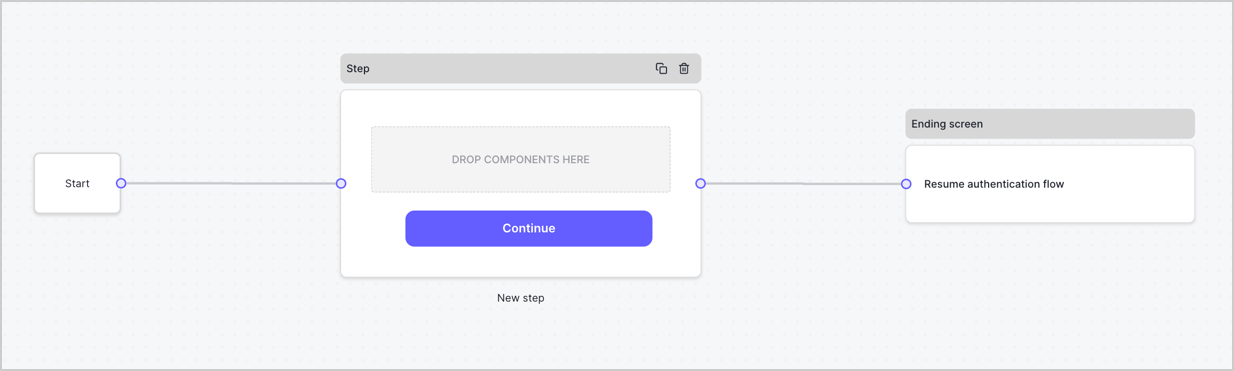
2. Select **Create Form** > **Start from scratch**.

By default, a new form contains a Start node, a Step node, and an Ending screen node.
<Frame>
  <img src="https://mintcdn.com/docs-staging-docs-ia-custom-database-connections/KuQLr_6PmoTHxAly/docs/images/cdy7uua7fh8z/2TZ9jSjgEcARFpULI6hz4R/a4319a1bd482f2ee5cc23100fdb2f42c/New-form-Forms-for-action-use-case.png?fit=max&auto=format&n=KuQLr_6PmoTHxAly&q=85&s=75c8c347165508a8ceae62e49f48f8b7" alt="Dashboard > Forms > Use Cases > Form" data-og-width="1234" width="1234" data-og-height="371" height="371" data-path="docs/images/cdy7uua7fh8z/2TZ9jSjgEcARFpULI6hz4R/a4319a1bd482f2ee5cc23100fdb2f42c/New-form-Forms-for-action-use-case.png" data-optimize="true" data-opv="3" srcset="https://mintcdn.com/docs-staging-docs-ia-custom-database-connections/KuQLr_6PmoTHxAly/docs/images/cdy7uua7fh8z/2TZ9jSjgEcARFpULI6hz4R/a4319a1bd482f2ee5cc23100fdb2f42c/New-form-Forms-for-action-use-case.png?w=280&fit=max&auto=format&n=KuQLr_6PmoTHxAly&q=85&s=ce90a3303ff86a555c8d6a2c9fe51181 280w, https://mintcdn.com/docs-staging-docs-ia-custom-database-connections/KuQLr_6PmoTHxAly/docs/images/cdy7uua7fh8z/2TZ9jSjgEcARFpULI6hz4R/a4319a1bd482f2ee5cc23100fdb2f42c/New-form-Forms-for-action-use-case.png?w=560&fit=max&auto=format&n=KuQLr_6PmoTHxAly&q=85&s=5f366a312cf53628df17825eebcbe56e 560w, https://mintcdn.com/docs-staging-docs-ia-custom-database-connections/KuQLr_6PmoTHxAly/docs/images/cdy7uua7fh8z/2TZ9jSjgEcARFpULI6hz4R/a4319a1bd482f2ee5cc23100fdb2f42c/New-form-Forms-for-action-use-case.png?w=840&fit=max&auto=format&n=KuQLr_6PmoTHxAly&q=85&s=40e132f55b25319321c931f9e48c3de9 840w, https://mintcdn.com/docs-staging-docs-ia-custom-database-connections/KuQLr_6PmoTHxAly/docs/images/cdy7uua7fh8z/2TZ9jSjgEcARFpULI6hz4R/a4319a1bd482f2ee5cc23100fdb2f42c/New-form-Forms-for-action-use-case.png?w=1100&fit=max&auto=format&n=KuQLr_6PmoTHxAly&q=85&s=3ccc3dd6e0d36bb2cd1ec78c30b713b6 1100w, https://mintcdn.com/docs-staging-docs-ia-custom-database-connections/KuQLr_6PmoTHxAly/docs/images/cdy7uua7fh8z/2TZ9jSjgEcARFpULI6hz4R/a4319a1bd482f2ee5cc23100fdb2f42c/New-form-Forms-for-action-use-case.png?w=1650&fit=max&auto=format&n=KuQLr_6PmoTHxAly&q=85&s=ce3ef28bcf716f5928d9cd14e69992cf 1650w, https://mintcdn.com/docs-staging-docs-ia-custom-database-connections/KuQLr_6PmoTHxAly/docs/images/cdy7uua7fh8z/2TZ9jSjgEcARFpULI6hz4R/a4319a1bd482f2ee5cc23100fdb2f42c/New-form-Forms-for-action-use-case.png?w=2500&fit=max&auto=format&n=KuQLr_6PmoTHxAly&q=85&s=349b48da2f39a4f52129c1bfe2c4ef17 2500w" />
</Frame>

### Configure the Step node

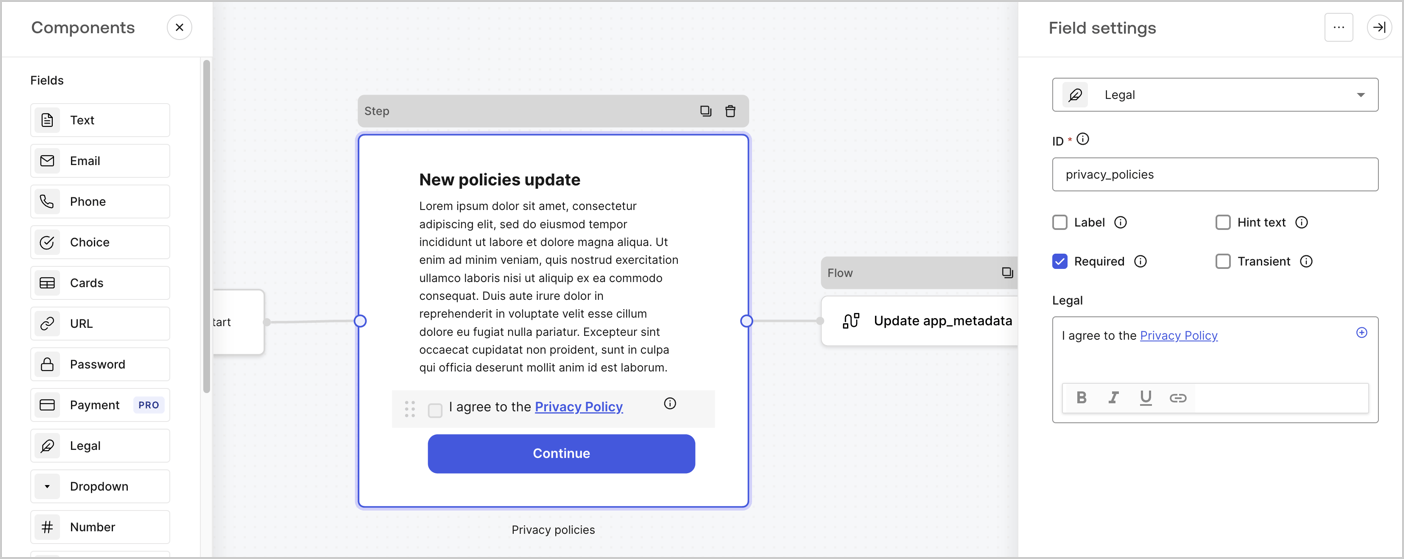
The Step node is the graphical interface visible to users. Add [Fields](/docs/customize/forms/nodes-and-components) to the Step node to collect the new agreement acceptance value by following these steps:

1. Drag a **Rich text** field from the **Components menu** into the **Step** node.

   * **Rich text**: Enter a description of your privacy policies updates.
   * Select **Save**.
2. Drag a **Legal** field into the **Step** node.

   * **ID**: Enter `privacy_policies`.
   * **Required**: Enable the checkbox.
   * **Legal**: Enter `I agree to the Privacy Policy`.
   * Select **Save**.
3. Select **Publish** to save.
<Frame>
  <img src="https://mintcdn.com/docs-staging-docs-ia-custom-database-connections/ybu1eTIpF8QemAl3/docs/images/cdy7uua7fh8z/59zFFjQjAnjogkc2QGIqqJ/0ad66b1b636544122aa4e65968b76c2c/privacy-policy-step-node.png?fit=max&auto=format&n=ybu1eTIpF8QemAl3&q=85&s=46d7d867bec45b39ba460b6ede0b5e9c" alt="Dashboard > Actions > Forms > Use case privacy policy step node" data-og-width="1404" width="1404" data-og-height="559" height="559" data-path="docs/images/cdy7uua7fh8z/59zFFjQjAnjogkc2QGIqqJ/0ad66b1b636544122aa4e65968b76c2c/privacy-policy-step-node.png" data-optimize="true" data-opv="3" srcset="https://mintcdn.com/docs-staging-docs-ia-custom-database-connections/ybu1eTIpF8QemAl3/docs/images/cdy7uua7fh8z/59zFFjQjAnjogkc2QGIqqJ/0ad66b1b636544122aa4e65968b76c2c/privacy-policy-step-node.png?w=280&fit=max&auto=format&n=ybu1eTIpF8QemAl3&q=85&s=6e6bccb89b30bbd766393d12864afbc8 280w, https://mintcdn.com/docs-staging-docs-ia-custom-database-connections/ybu1eTIpF8QemAl3/docs/images/cdy7uua7fh8z/59zFFjQjAnjogkc2QGIqqJ/0ad66b1b636544122aa4e65968b76c2c/privacy-policy-step-node.png?w=560&fit=max&auto=format&n=ybu1eTIpF8QemAl3&q=85&s=abc341296bd4c4575172a711fd80d3ed 560w, https://mintcdn.com/docs-staging-docs-ia-custom-database-connections/ybu1eTIpF8QemAl3/docs/images/cdy7uua7fh8z/59zFFjQjAnjogkc2QGIqqJ/0ad66b1b636544122aa4e65968b76c2c/privacy-policy-step-node.png?w=840&fit=max&auto=format&n=ybu1eTIpF8QemAl3&q=85&s=446f782500c31eaf71556b082f8fb38b 840w, https://mintcdn.com/docs-staging-docs-ia-custom-database-connections/ybu1eTIpF8QemAl3/docs/images/cdy7uua7fh8z/59zFFjQjAnjogkc2QGIqqJ/0ad66b1b636544122aa4e65968b76c2c/privacy-policy-step-node.png?w=1100&fit=max&auto=format&n=ybu1eTIpF8QemAl3&q=85&s=98b72ff6ce71256d1046f766934a3f16 1100w, https://mintcdn.com/docs-staging-docs-ia-custom-database-connections/ybu1eTIpF8QemAl3/docs/images/cdy7uua7fh8z/59zFFjQjAnjogkc2QGIqqJ/0ad66b1b636544122aa4e65968b76c2c/privacy-policy-step-node.png?w=1650&fit=max&auto=format&n=ybu1eTIpF8QemAl3&q=85&s=1aee84fa7aaf048dc5d3776c12293003 1650w, https://mintcdn.com/docs-staging-docs-ia-custom-database-connections/ybu1eTIpF8QemAl3/docs/images/cdy7uua7fh8z/59zFFjQjAnjogkc2QGIqqJ/0ad66b1b636544122aa4e65968b76c2c/privacy-policy-step-node.png?w=2500&fit=max&auto=format&n=ybu1eTIpF8QemAl3&q=85&s=042fb7abe56bf7bab2a4ccc88f148e28 2500w" />
</Frame>

### Configure the Flow node

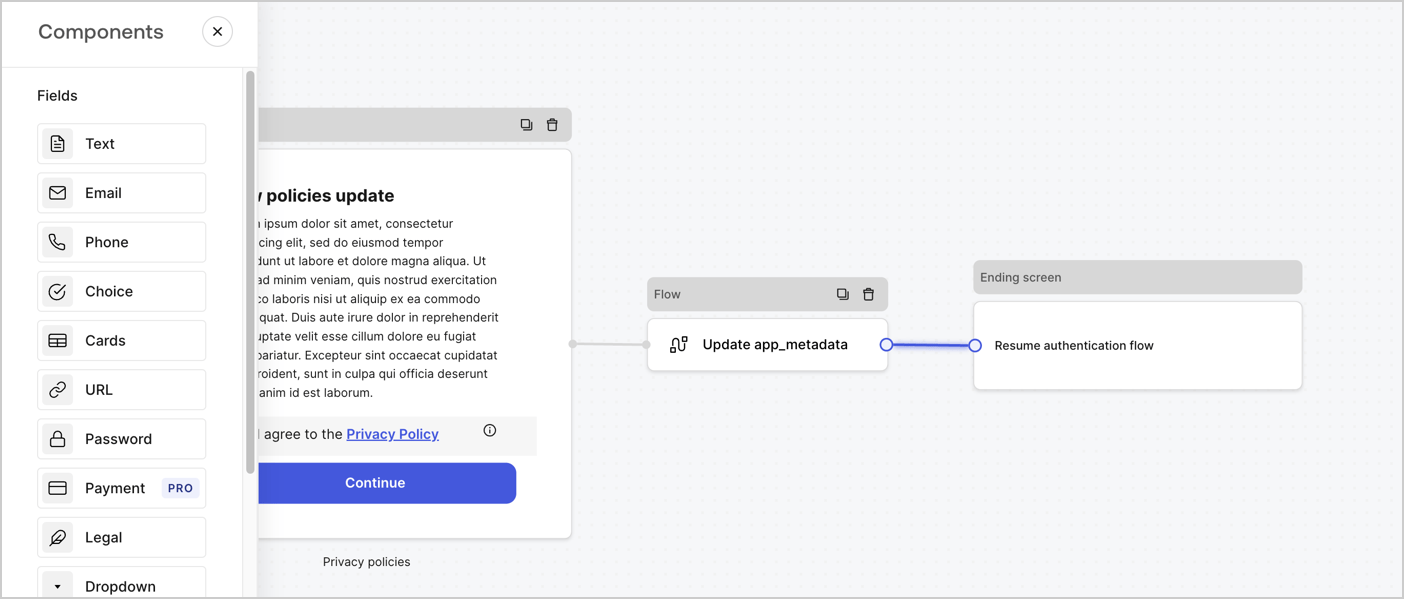
Add a **Flow** node after the **Step** node to update the `app_metadata` and resume the authentication flow by following these steps:

1. Select **Flow** from the bottom of the Form editor.
2. Remove the existing link between the **Step** and **Ending Screen** nodes.
3. Select the new **Flow** > **Click to add a flow** > **Create a new flow.**

   * Enter `Update app_metadata` in the **Name** field.
   * Select **Create**.
   * Select **Save**.
4. Link the **Flow** node to the **Step** and **Ending Screen** nodes as pictured below.
5. Select **Publish** to save.
<Frame>
  <img src="https://mintcdn.com/docs-staging-docs-ia-custom-database-connections/JWORpyOPsa11uP0R/docs/images/cdy7uua7fh8z/6YIkzm7SrpM9LW76AXuRzh/353c518fe82bbaa440836da1d83596d6/link-policies.png?fit=max&auto=format&n=JWORpyOPsa11uP0R&q=85&s=6cdaf1e1fa97ebaa98473d409b51f0a9" alt="Dashboard > Actions > Forms > Form" data-og-width="1404" width="1404" data-og-height="599" height="599" data-path="docs/images/cdy7uua7fh8z/6YIkzm7SrpM9LW76AXuRzh/353c518fe82bbaa440836da1d83596d6/link-policies.png" data-optimize="true" data-opv="3" srcset="https://mintcdn.com/docs-staging-docs-ia-custom-database-connections/JWORpyOPsa11uP0R/docs/images/cdy7uua7fh8z/6YIkzm7SrpM9LW76AXuRzh/353c518fe82bbaa440836da1d83596d6/link-policies.png?w=280&fit=max&auto=format&n=JWORpyOPsa11uP0R&q=85&s=53a8e1b6692c359748072ec1026a9681 280w, https://mintcdn.com/docs-staging-docs-ia-custom-database-connections/JWORpyOPsa11uP0R/docs/images/cdy7uua7fh8z/6YIkzm7SrpM9LW76AXuRzh/353c518fe82bbaa440836da1d83596d6/link-policies.png?w=560&fit=max&auto=format&n=JWORpyOPsa11uP0R&q=85&s=b1161ade81885a5b3bf533182091dc0e 560w, https://mintcdn.com/docs-staging-docs-ia-custom-database-connections/JWORpyOPsa11uP0R/docs/images/cdy7uua7fh8z/6YIkzm7SrpM9LW76AXuRzh/353c518fe82bbaa440836da1d83596d6/link-policies.png?w=840&fit=max&auto=format&n=JWORpyOPsa11uP0R&q=85&s=41d0e9745e7a84923be3048d42ca35af 840w, https://mintcdn.com/docs-staging-docs-ia-custom-database-connections/JWORpyOPsa11uP0R/docs/images/cdy7uua7fh8z/6YIkzm7SrpM9LW76AXuRzh/353c518fe82bbaa440836da1d83596d6/link-policies.png?w=1100&fit=max&auto=format&n=JWORpyOPsa11uP0R&q=85&s=50786b2f722ae0b06eb59a3dd67540a3 1100w, https://mintcdn.com/docs-staging-docs-ia-custom-database-connections/JWORpyOPsa11uP0R/docs/images/cdy7uua7fh8z/6YIkzm7SrpM9LW76AXuRzh/353c518fe82bbaa440836da1d83596d6/link-policies.png?w=1650&fit=max&auto=format&n=JWORpyOPsa11uP0R&q=85&s=1b3a4b2cb40baed6914e51d8d0a70360 1650w, https://mintcdn.com/docs-staging-docs-ia-custom-database-connections/JWORpyOPsa11uP0R/docs/images/cdy7uua7fh8z/6YIkzm7SrpM9LW76AXuRzh/353c518fe82bbaa440836da1d83596d6/link-policies.png?w=2500&fit=max&auto=format&n=JWORpyOPsa11uP0R&q=85&s=35c07d50491d2cfe82d4c86b1b0b363a 2500w" />
</Frame>

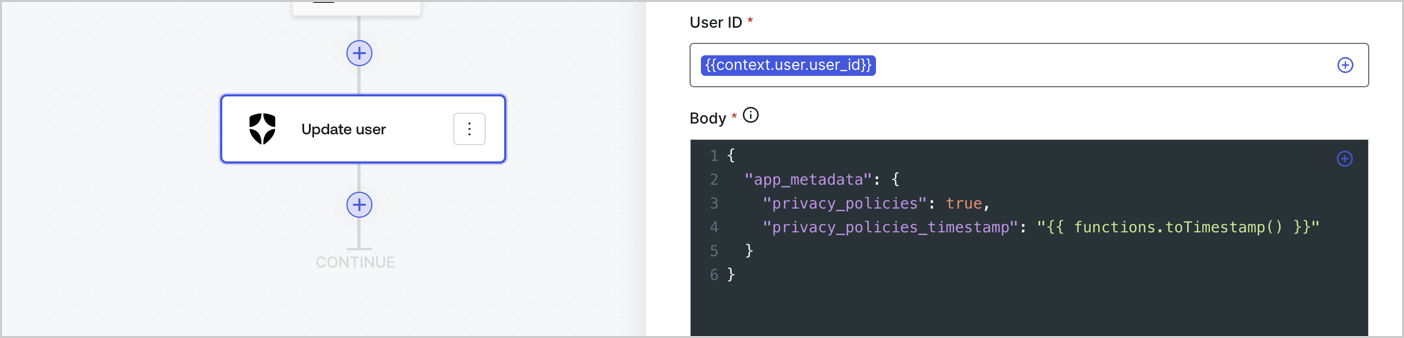
Add an Auth0 Update user action to the flow by following these steps:

1. Select the **Flow** **Update app\_metadata** > **Edit flow** to open the Flow editor in a new tab.
2. Below the StartAction, select the **+** icon to add an **Update user** action. Complete the fields below, then select **Save** to continue.

   * **Connection**: Select from the dropdown the Vault connection to your M2M application.

   * **User ID**: Enter `{{context.user.user_id}}`.

   * **Body**: Copy and paste the following code to update the app\_metadata with the privacy\_policies and privacy\_policies\_timestamp properties.

     ```text lines theme={null}
     {
       "app_metadata": {
         "privacy_policies": true,
         "privacy_policies_timestamp": "{{ functions.toTimestamp() }}"
       }
     }
     ```

   * Select **Save**.
3. Select **Publish** to save.
<Frame>
  <img src="https://mintcdn.com/docs-staging-docs-ia-custom-database-connections/GLNR_MCIZBQ18Neh/docs/images/cdy7uua7fh8z/CvMNIwWrOUwaFW4X3G28p/1fb70ae57a20749d9ffaaba8dc0b7e26/update-user-privacy.png?fit=max&auto=format&n=GLNR_MCIZBQ18Neh&q=85&s=f40adfadcfc9a16e73709ca6773a0332" alt="Dashboard > Actions > Forms > User case privacy policy code" data-og-width="1404" width="1404" data-og-height="338" height="338" data-path="docs/images/cdy7uua7fh8z/CvMNIwWrOUwaFW4X3G28p/1fb70ae57a20749d9ffaaba8dc0b7e26/update-user-privacy.png" data-optimize="true" data-opv="3" srcset="https://mintcdn.com/docs-staging-docs-ia-custom-database-connections/GLNR_MCIZBQ18Neh/docs/images/cdy7uua7fh8z/CvMNIwWrOUwaFW4X3G28p/1fb70ae57a20749d9ffaaba8dc0b7e26/update-user-privacy.png?w=280&fit=max&auto=format&n=GLNR_MCIZBQ18Neh&q=85&s=6c42a0f1309c076dbcf4d7303a52c551 280w, https://mintcdn.com/docs-staging-docs-ia-custom-database-connections/GLNR_MCIZBQ18Neh/docs/images/cdy7uua7fh8z/CvMNIwWrOUwaFW4X3G28p/1fb70ae57a20749d9ffaaba8dc0b7e26/update-user-privacy.png?w=560&fit=max&auto=format&n=GLNR_MCIZBQ18Neh&q=85&s=490ff029a2ee52afb8c83bd6c62c4c3d 560w, https://mintcdn.com/docs-staging-docs-ia-custom-database-connections/GLNR_MCIZBQ18Neh/docs/images/cdy7uua7fh8z/CvMNIwWrOUwaFW4X3G28p/1fb70ae57a20749d9ffaaba8dc0b7e26/update-user-privacy.png?w=840&fit=max&auto=format&n=GLNR_MCIZBQ18Neh&q=85&s=927623f1805133472a12f19059ac9995 840w, https://mintcdn.com/docs-staging-docs-ia-custom-database-connections/GLNR_MCIZBQ18Neh/docs/images/cdy7uua7fh8z/CvMNIwWrOUwaFW4X3G28p/1fb70ae57a20749d9ffaaba8dc0b7e26/update-user-privacy.png?w=1100&fit=max&auto=format&n=GLNR_MCIZBQ18Neh&q=85&s=35aa4f8ba801ccdfea606f1faee00ab7 1100w, https://mintcdn.com/docs-staging-docs-ia-custom-database-connections/GLNR_MCIZBQ18Neh/docs/images/cdy7uua7fh8z/CvMNIwWrOUwaFW4X3G28p/1fb70ae57a20749d9ffaaba8dc0b7e26/update-user-privacy.png?w=1650&fit=max&auto=format&n=GLNR_MCIZBQ18Neh&q=85&s=65c19f59d94c70a15738543dbaba6c94 1650w, https://mintcdn.com/docs-staging-docs-ia-custom-database-connections/GLNR_MCIZBQ18Neh/docs/images/cdy7uua7fh8z/CvMNIwWrOUwaFW4X3G28p/1fb70ae57a20749d9ffaaba8dc0b7e26/update-user-privacy.png?w=2500&fit=max&auto=format&n=GLNR_MCIZBQ18Neh&q=85&s=7a55b641ce1c300c74cd0c4ee9c27fc9 2500w" />
</Frame>

<Callout icon="file-lines" color="#0EA5E9" iconType="regular">
  The flow **Update app\_metadata** adds a `privacy_policies true` value to the app`_metadata` object and also generates a timestamp with a [helper function.](/docs/customize/forms/variables)
</Callout>

## Retrieve the form render code

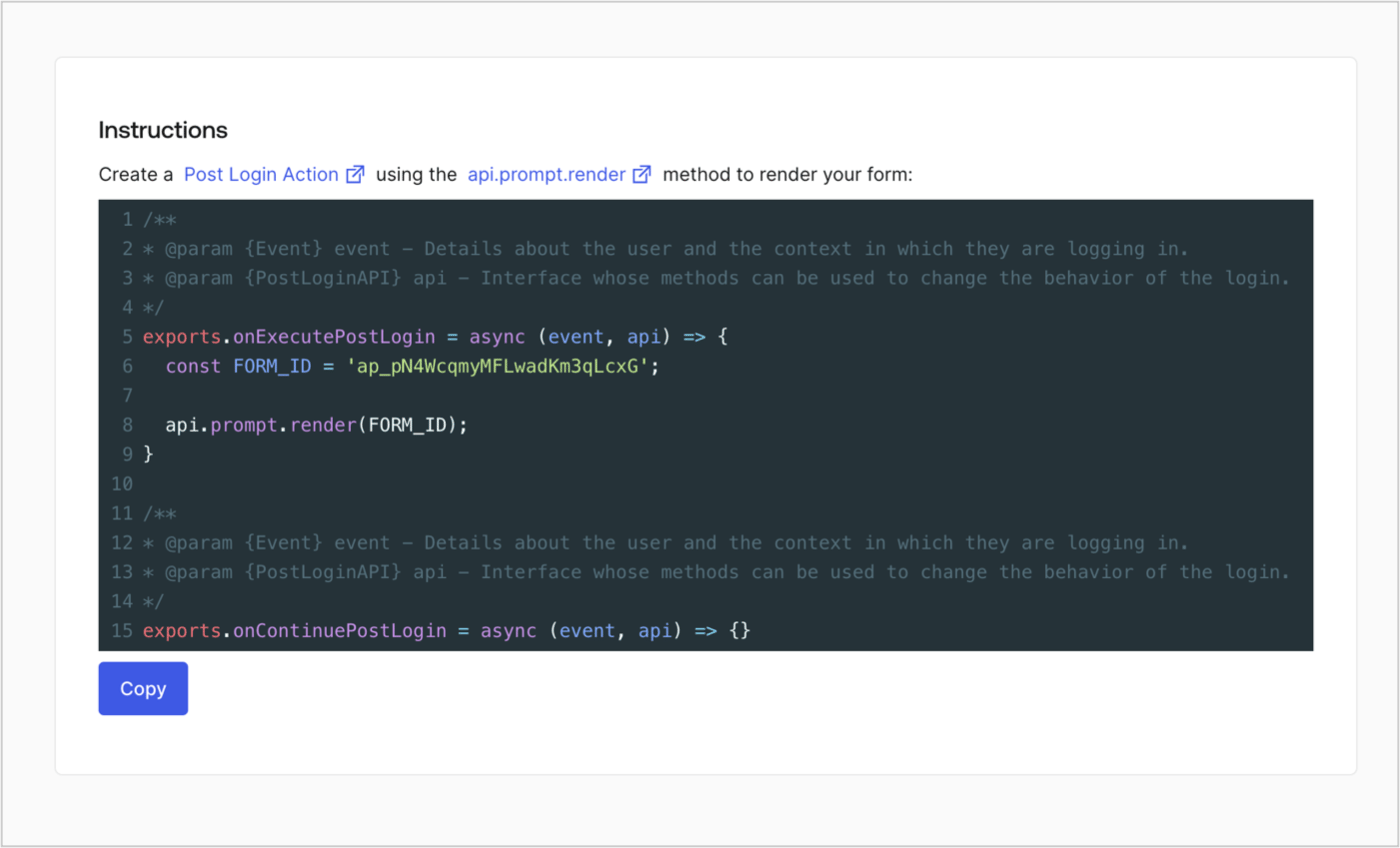
Retrieve your form render code to visually render the form with a custom Post Login Action by following these steps:

* From the Form editor, select **`<> Render`**.
* Select **Copy**.
<Frame>
  <img src="https://mintcdn.com/docs-staging-docs-ia-custom-database-connections/L3zf4A6yfBj46S-s/docs/images/cdy7uua7fh8z/2EIUzc539sq9lwoTKbjoJv/496a864c0fc44a782c9cadca119dbfb0/embed.png?fit=max&auto=format&n=L3zf4A6yfBj46S-s&q=85&s=f67dcf4e7d611b07471ffb1991ffbebd" alt="Dashboard > Actions > Forms > Form > Embed" data-og-width="1400" width="1400" data-og-height="848" height="848" data-path="docs/images/cdy7uua7fh8z/2EIUzc539sq9lwoTKbjoJv/496a864c0fc44a782c9cadca119dbfb0/embed.png" data-optimize="true" data-opv="3" srcset="https://mintcdn.com/docs-staging-docs-ia-custom-database-connections/L3zf4A6yfBj46S-s/docs/images/cdy7uua7fh8z/2EIUzc539sq9lwoTKbjoJv/496a864c0fc44a782c9cadca119dbfb0/embed.png?w=280&fit=max&auto=format&n=L3zf4A6yfBj46S-s&q=85&s=22d3f34e35c32cc0d876dc667a980d62 280w, https://mintcdn.com/docs-staging-docs-ia-custom-database-connections/L3zf4A6yfBj46S-s/docs/images/cdy7uua7fh8z/2EIUzc539sq9lwoTKbjoJv/496a864c0fc44a782c9cadca119dbfb0/embed.png?w=560&fit=max&auto=format&n=L3zf4A6yfBj46S-s&q=85&s=b7a37257960ff5ed4987812114704253 560w, https://mintcdn.com/docs-staging-docs-ia-custom-database-connections/L3zf4A6yfBj46S-s/docs/images/cdy7uua7fh8z/2EIUzc539sq9lwoTKbjoJv/496a864c0fc44a782c9cadca119dbfb0/embed.png?w=840&fit=max&auto=format&n=L3zf4A6yfBj46S-s&q=85&s=f771b2c32c8036850b4d6a834b3ff46f 840w, https://mintcdn.com/docs-staging-docs-ia-custom-database-connections/L3zf4A6yfBj46S-s/docs/images/cdy7uua7fh8z/2EIUzc539sq9lwoTKbjoJv/496a864c0fc44a782c9cadca119dbfb0/embed.png?w=1100&fit=max&auto=format&n=L3zf4A6yfBj46S-s&q=85&s=0ca10edef615c5c29323b8a143bd2600 1100w, https://mintcdn.com/docs-staging-docs-ia-custom-database-connections/L3zf4A6yfBj46S-s/docs/images/cdy7uua7fh8z/2EIUzc539sq9lwoTKbjoJv/496a864c0fc44a782c9cadca119dbfb0/embed.png?w=1650&fit=max&auto=format&n=L3zf4A6yfBj46S-s&q=85&s=500331f0db10e47a2c8dcad27f73d86c 1650w, https://mintcdn.com/docs-staging-docs-ia-custom-database-connections/L3zf4A6yfBj46S-s/docs/images/cdy7uua7fh8z/2EIUzc539sq9lwoTKbjoJv/496a864c0fc44a782c9cadca119dbfb0/embed.png?w=2500&fit=max&auto=format&n=L3zf4A6yfBj46S-s&q=85&s=c7a1b36471998ee69c6ae474ed95ade2 2500w" />
</Frame>

## Create a Post Login Action

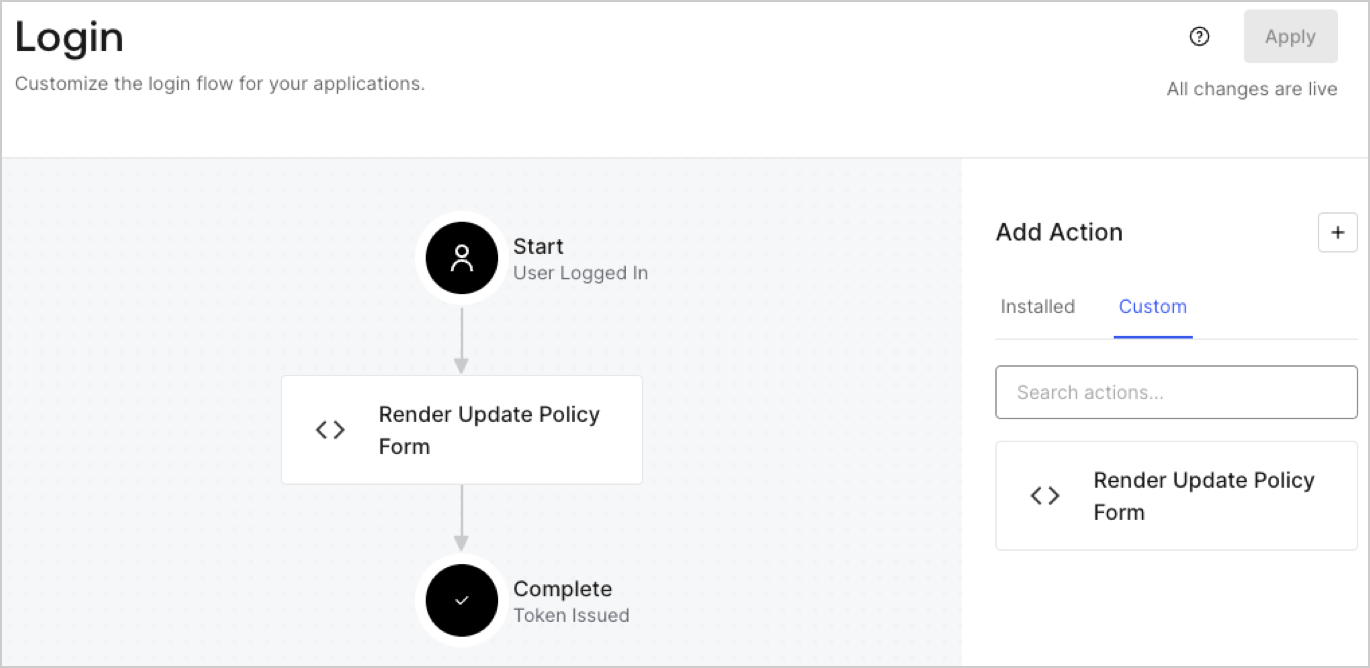
Create a post-login Action to render your form by following these steps:

1. Navigate to **Auth0 Dashboard > Actions > Flows > Login.**
2. Select the **+** icon and Select **Build from scratch**:

   * **Name**: Enter `Render Update Policy Form`.
   * **Trigger**: Select `Login / Post Login`.
   * **Runtime**: Select the recommended version.
3. Select **Create**.

To configure the post-login Action:

1. Delete the existing code from the Code editor.
2. Paste the form render code into the Code editor.
3. Edit the code to define the conditional logic that will render the form.

   ```javascript lines theme={null}
   /**
   * @param {Event} event - Details about the user and the context in which they are logging in.
   * @param {PostLoginAPI} api - Interface whose methods can be used to change the behavior of the login.
   */
   exports.onExecutePostLogin = async (event, api) => {
     const FORM_ID = 'REPLACE_WITH_YOUR_FORM_ID';

     if (event.user.app_metadata.privacy_policies !== true) {
       api.prompt.render(FORM_ID);
     }
   }

   exports.onContinuePostLogin = async (event, api) => { }
   ```

   <Callout icon="file-lines" color="#0EA5E9" iconType="regular">
     The example code above will render the form when a user is missing the app metadata `privacy_policies` property.
   </Callout>
4. Select **Deploy.**
5. Drag and Drop the **Render Update Policy Form** Action to the **Login** flow.
   <Frame>
     <img src="https://mintcdn.com/docs-staging-docs-ia-custom-database-connections/MpDBdzDAGJJa-9jf/docs/images/cdy7uua7fh8z/5TOwDgevZsBqd7yZynUYWU/41ca909dc3007aed4f40ff794a05efa5/postlogin.png?fit=max&auto=format&n=MpDBdzDAGJJa-9jf&q=85&s=53ed89dec529e0799c63d8dd19455c7c" alt="Dashboard > Forms > Use Case > Render update policy form login action" data-og-width="1370" width="1370" data-og-height="668" height="668" data-path="docs/images/cdy7uua7fh8z/5TOwDgevZsBqd7yZynUYWU/41ca909dc3007aed4f40ff794a05efa5/postlogin.png" data-optimize="true" data-opv="3" srcset="https://mintcdn.com/docs-staging-docs-ia-custom-database-connections/MpDBdzDAGJJa-9jf/docs/images/cdy7uua7fh8z/5TOwDgevZsBqd7yZynUYWU/41ca909dc3007aed4f40ff794a05efa5/postlogin.png?w=280&fit=max&auto=format&n=MpDBdzDAGJJa-9jf&q=85&s=90a4a25b6db6f34c1773cc47506bd89c 280w, https://mintcdn.com/docs-staging-docs-ia-custom-database-connections/MpDBdzDAGJJa-9jf/docs/images/cdy7uua7fh8z/5TOwDgevZsBqd7yZynUYWU/41ca909dc3007aed4f40ff794a05efa5/postlogin.png?w=560&fit=max&auto=format&n=MpDBdzDAGJJa-9jf&q=85&s=2b52ebaca05b4a29e178db953f8ddd64 560w, https://mintcdn.com/docs-staging-docs-ia-custom-database-connections/MpDBdzDAGJJa-9jf/docs/images/cdy7uua7fh8z/5TOwDgevZsBqd7yZynUYWU/41ca909dc3007aed4f40ff794a05efa5/postlogin.png?w=840&fit=max&auto=format&n=MpDBdzDAGJJa-9jf&q=85&s=8c50b844cd2185c13eaeceb4b2f86309 840w, https://mintcdn.com/docs-staging-docs-ia-custom-database-connections/MpDBdzDAGJJa-9jf/docs/images/cdy7uua7fh8z/5TOwDgevZsBqd7yZynUYWU/41ca909dc3007aed4f40ff794a05efa5/postlogin.png?w=1100&fit=max&auto=format&n=MpDBdzDAGJJa-9jf&q=85&s=fcb729defa53852daf75ce8bc9bbe3fd 1100w, https://mintcdn.com/docs-staging-docs-ia-custom-database-connections/MpDBdzDAGJJa-9jf/docs/images/cdy7uua7fh8z/5TOwDgevZsBqd7yZynUYWU/41ca909dc3007aed4f40ff794a05efa5/postlogin.png?w=1650&fit=max&auto=format&n=MpDBdzDAGJJa-9jf&q=85&s=bc93d2787223caeadbc6a064f899dae2 1650w, https://mintcdn.com/docs-staging-docs-ia-custom-database-connections/MpDBdzDAGJJa-9jf/docs/images/cdy7uua7fh8z/5TOwDgevZsBqd7yZynUYWU/41ca909dc3007aed4f40ff794a05efa5/postlogin.png?w=2500&fit=max&auto=format&n=MpDBdzDAGJJa-9jf&q=85&s=82cc431cb1e28a65baa6b8bc247d942a 2500w" />
   </Frame>
6. Select **Apply.**

### Test implementation

Test the implementation by following these steps:

1. Log in with an existing user whose app`_metadata` attribute `privacy_policies` does not have a value.
2. The post-login Action in the Login flow will render the form and prompt for acceptance.
3. Select **Auth0 Dashboard > User Management > Users,** locate the user and verify that the `app_metadata` attribute `privacy_policies` contains a `true` value and a timestamp.
